Discover Sunthai: A Modern Script Font for Web Design
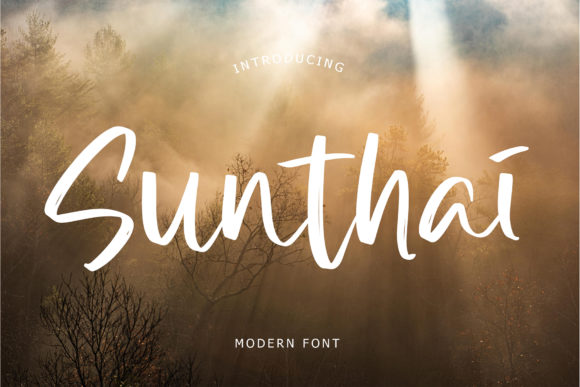
As a web designer, I recently embarked on a project to revamp a boutique online store. The goal was to create a visually appealing and user-friendly website that would stand out in the crowded e-commerce space. One of the key elements in achieving this was selecting the right font. After some exploration, I stumbled upon Sunthai, a modern script with a brush style that instantly caught my eye.
The Visual Charm of Sunthai
Sunthai is not just any typeface; it has an incredibly stylish look that can transform the overall aesthetic of a website. Its brush-like strokes give it a hand-painted, organic feel, making it perfect for adding a touch of elegance and creativity. The font's fluidity and unique character make it ideal for logos, quotes, and invitations, but how would it fare in a more functional digital environment?
Testing Sunthai in a Real Website Project
I decided to test Sunthai in the hero section of the online store. The hero image was a high-quality photograph of a model wearing one of the store's signature dresses. Placing Sunthai over this image, I noticed how well it complemented the visual. The font's elegant curves and dynamic flow made the headline "Welcome to Our New Collection" truly stand out, drawing the visitor's attention immediately.
Readability and Visual Hierarchy
One of the critical aspects of web design is readability. While Sunthai is visually stunning, I had to ensure it was also legible. For the hero section, I used a larger font size and a slight drop shadow to enhance readability against the background image. This combination worked beautifully, maintaining both the aesthetic appeal and the clarity of the text.
For other sections, such as product descriptions and call-to-action buttons, I opted for a simpler sans serif font. This created a clear visual hierarchy, with Sunthai serving as the main decorative element and the sans serif providing the necessary readability for longer text.
Using Sunthai in Different Sections
- Headers and Hero Sections: Sunthai works exceptionally well in headers and hero sections, where its unique style can make a strong first impression.
- Call-to-Action Areas: For CTA buttons, using Sunthai for short, impactful phrases like "Shop Now" or "Learn More" can add a touch of elegance and urgency.
- Online Shop Banners: In banners, Sunthai can be used for promotional messages, creating a visually engaging and memorable experience.
- Blog Graphics and Social Media Posts: Sunthai's artistic flair makes it a great choice for blog headers and social media graphics, enhancing the overall brand identity.
Font Pairing and Consistency
To maintain a balanced and professional look, I paired Sunthai with a clean, simple sans serif font for body copy. This combination ensures that the website remains visually appealing without sacrificing readability. For example, in the product pages, the product names and main headings were in Sunthai, while the detailed descriptions and specifications were in the sans serif font.
Practical Tips for Using Sunthai
- Check Readability on Mobile Screens: Ensure that Sunthai is legible on smaller screens by using appropriate sizes and line heights.
- Use for Short Texts: Sunthai is best suited for short, impactful texts like headlines and CTA buttons, rather than long paragraphs.
- Test on Different Backgrounds: Experiment with different background colors and images to find the best contrast for optimal readability.
- Consider Webfont Availability: Before using Sunthai, check if it is available as a webfont and if it supports the necessary file formats (e.g., WOFF, WOFF2).
- Review Licensing: Make sure to review the commercial licensing terms to ensure you can use Sunthai for your specific project, whether it's a client website or an online store.
Final Thoughts on Sunthai
Incorporating Sunthai into the boutique online store's design was a game-changer. It added a level of sophistication and creativity that set the website apart from its competitors. By carefully considering its use in different sections and pairing it with a complementary sans serif font, we achieved a balanced and visually appealing design. Whether you're working on a creative portfolio, a coaching website, or a product landing page, Sunthai is a premium font that can elevate your digital projects and enhance the overall user experience.